Send SPL Tokens & Memecoins to Multiple Wallets on Solana
Send SPL tokens or memecoins to multiple Solana wallets in one go. Step-by-step guide, ultra-low fees, no coding required.
 Koudous Salifou11 min read
Sending SPL tokens to 100 wallets one by one means 100 wallet popups, 100 signatures, and a long evening clicking. Solana fees are cheap, but your time isn't.
This guide shows you how to send SPL tokens — your memecoin, USDC, BONK, or any custom SPL — to as many Solana wallets as you need, with one connected wallet and a CSV of recipients. No code, no scripts, no Anchor program to deploy.
TL;DR
- What you'll do: send SPL tokens (or native SOL) to dozens, hundreds or thousands of Solana wallets without sending one transaction at a time.
- What you need: a Solana wallet (Phantom, Solflare, Backpack), some SOL for fees, and the SPL tokens you want to distribute.
- Time: under 5 minutes.
- No approval transaction — unlike ERC20 on Ethereum, Solana doesn't use an allowance model.
Skip the tutorial — open Metasender for Solana
Why batch transfer SPL tokens?
Memecoin airdrops, DAO contributor payouts, NFT-mint whitelist rewards, presale distributions — every Solana project hits the same wall the day it has more than 20 wallets to pay.
Sending one transfer at a time on Solana is technically cheap (a few thousand lamports per signature), but the friction is real:
- One wallet popup per recipient
- One block confirmation to wait for between each
- Mistakes are unrecoverable once signed
A batch transfer bundles many transfers into one signed transaction, then automatically splits into multiple if you exceed the network's per-transaction size limit. You sign a few times, the SPL tokens land everywhere at once.
Prerequisites
Before starting, make sure you have:
- A Solana wallet — Phantom, Solflare, Backpack, or any Solana Wallet Adapter compatible wallet.
- The SPL tokens you want to send — held in the connected wallet.
- Some SOL for fees — to cover the Metasender fee, network gas, and any new Associated Token Accounts that need creating for recipients (see the cost section below).
- A list of recipients with amounts — ready to paste row by row, or as a CSV file.
The app supports Solana Mainnet and Devnet so you can test with fake tokens before sending the real ones.
Step-by-step: send SPL tokens to multiple wallets on Solana
The flow has three steps: Prepare → Approve → Send. Heads up: on Solana, "Approve" is a review screen, not an on-chain transaction (more on that below).
Step 1 — Open Metasender and connect your wallet
Go to solana.metasender.co.
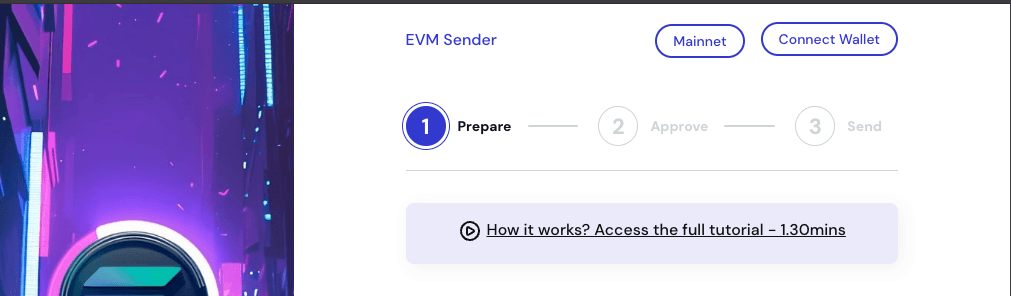
Click Connect Wallet in the top-right corner. Pick your wallet provider — Phantom, Solflare, Backpack, etc. — and approve the connection request inside your wallet.
Step 2 — Select the network
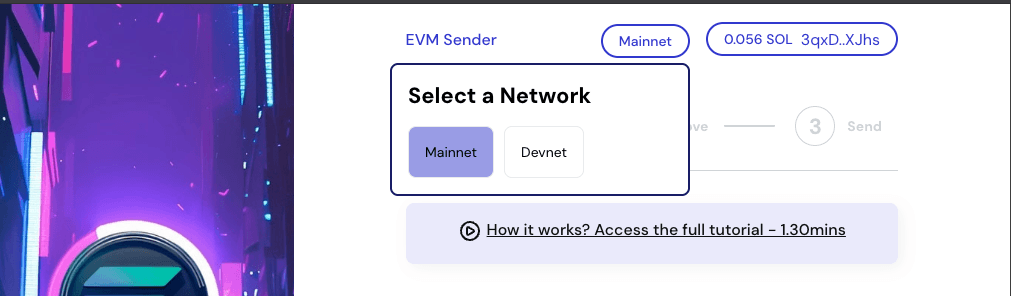
Use the network selector to pick Mainnet or Devnet.
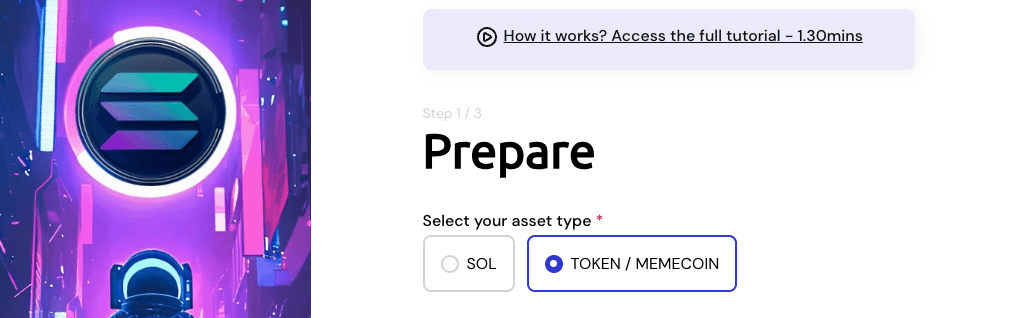
Step 3 — Choose Token / MEMECOIN as the asset type
Under Select your asset type, pick Token / MEMECOIN.
The other options are Native for plain SOL transfers.
Step 4 — Pick the SPL token to send
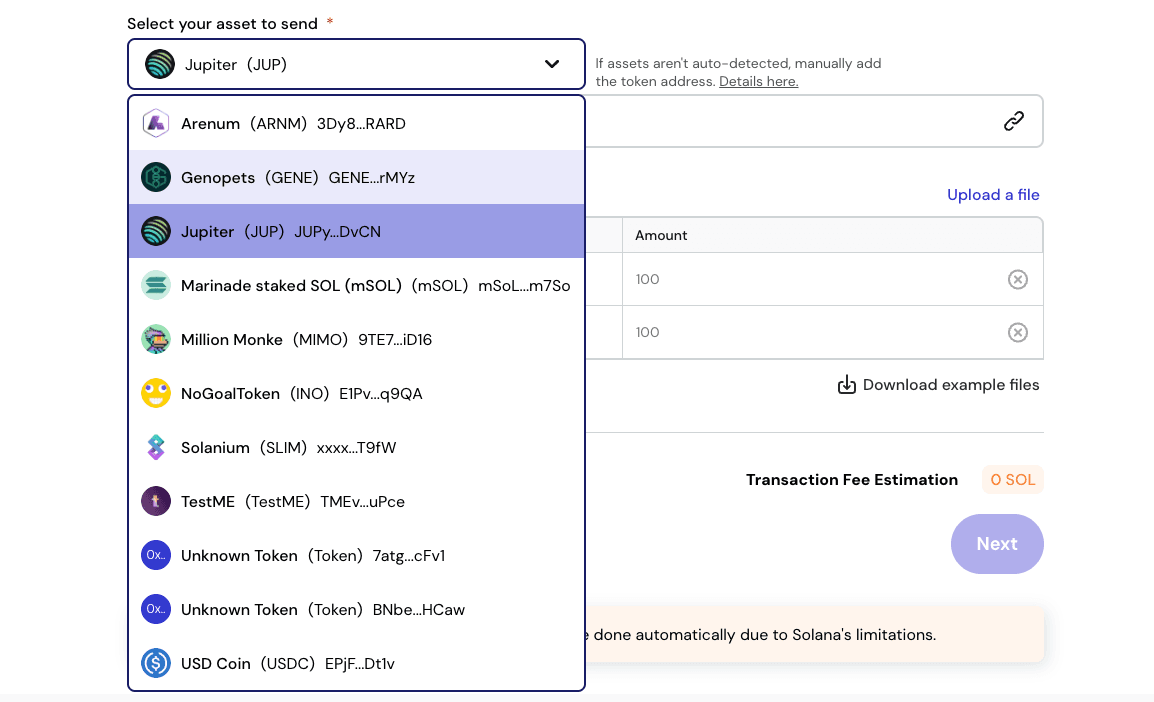
Once your wallet is connected, Metasender automatically scans it and lists every SPL token detected, with its logo, name and symbol.
Click Select your asset to send and choose the token from the dropdown.
If your token isn't auto-detected (rare for less common memecoins or freshly minted tokens), paste the mint address manually in the Enter the SPL token address field. Metasender resolves the mint info from the chain directly.
Skip the tutorial
Distribute your tokens to multiple wallets in 30 seconds — free, no signup.
Step 5 — Add the recipients
Now the important part: provide your list of recipient addresses with amounts. Two options.
Option A — Manual entry
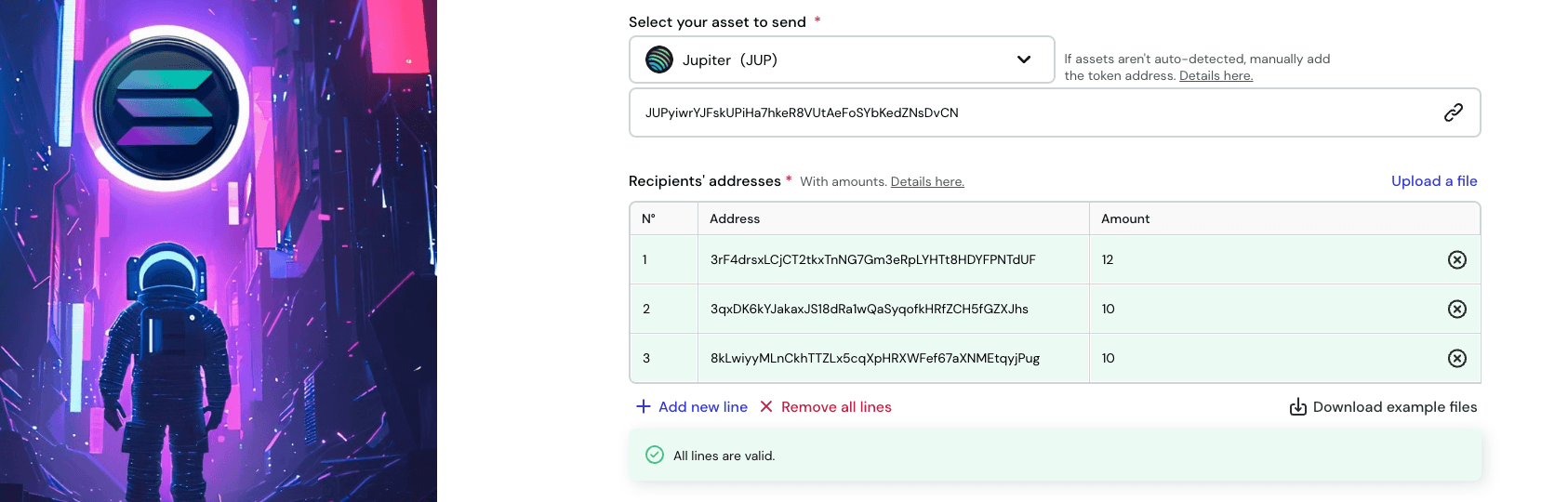
Type or paste each recipient's Solana address (Base58, 32–44 characters) and the amount of tokens to send. Metasender validates each row in real time:
- Green border — valid Solana address and amount
- Red border — invalid address or amount
Click Add new line to add more rows. The table scrolls infinitely as the list grows.
Option B — CSV upload
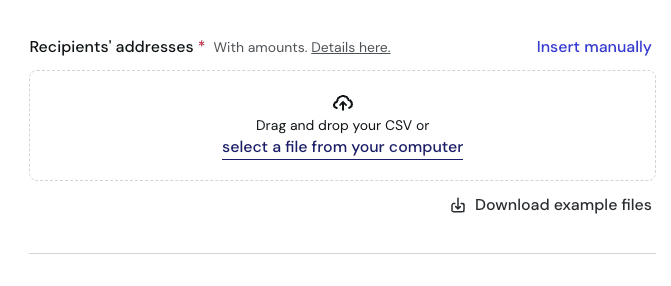
Click Upload a file and drop your CSV. The format is straightforward:
address,amount
9WzDXwBbmkg8ZTbNMqUxvQRAyrZzDsGYdLVL9zYtAWWM,1000
GThUX1Atko4tqhN2NaiTazWSeFWMuiUiswQrAbf9XynS,500.25
HXtBm8XZbxaTt41uqaKhwUAa6Z1aPyvJdsZVENiWsetB,250
A header row is optional. Decimals are allowed and Metasender handles the on-chain decimal conversion (and the Token-2022 transfer-fee adjustment) automatically.
Grab a sample CSV from the Download example files button if you want a template.
Step 6 — Review and click Next
Once every row is valid, click Next at the bottom of the page.
Metasender shows an estimated transaction fee in SOL at the top of the step area so you can sanity-check before continuing.
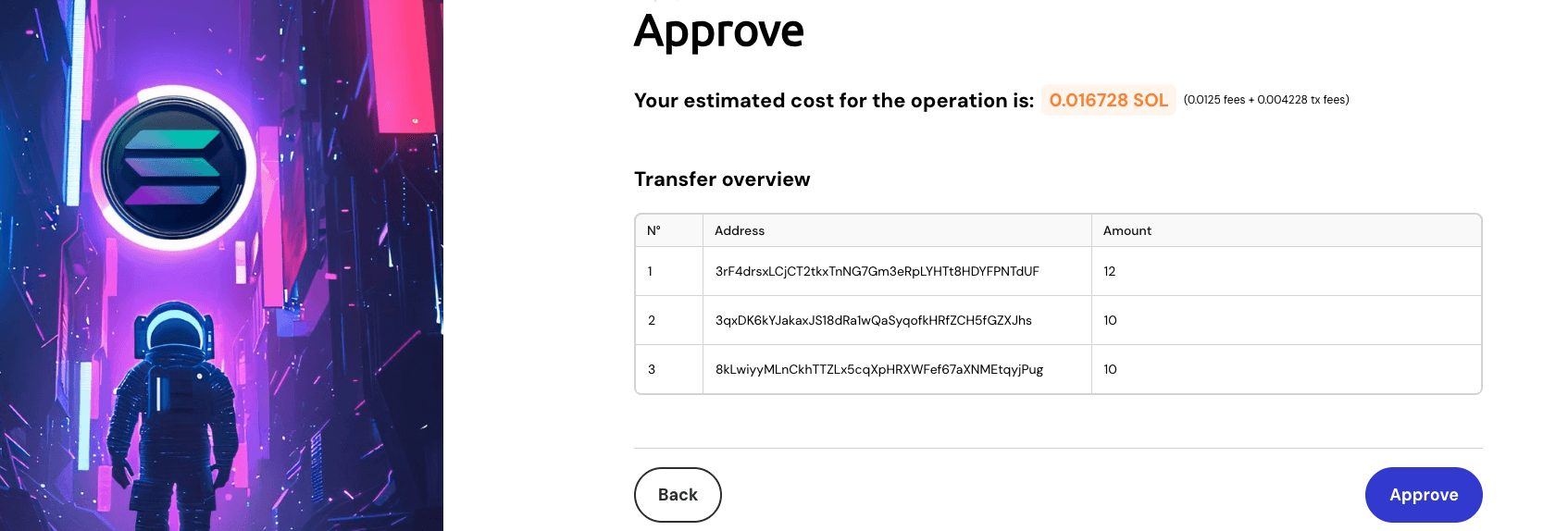
Step 7 — Review the cost on the Approve screen
You're now on Step 2: Approve.
This is where Solana differs sharply from EVM chains: there's no on-chain approval transaction. Solana doesn't use the ERC20 allowance model — programs can move tokens you sign for, period. The "Approve" screen here is purely a review:
- Estimated total cost — Metasender fee + estimated network fee + ATA creation fee (in SOL)
- Per-transaction cost — shown if your batch is larger than the per-transaction recipient cap (Metasender splits into multiple transactions; see the FAQ)
- Transfer overview — read-only preview of every recipient and amount
Click Approve. Nothing is signed yet — this just advances you to the send step.
Step 8 — Sign the send transactions
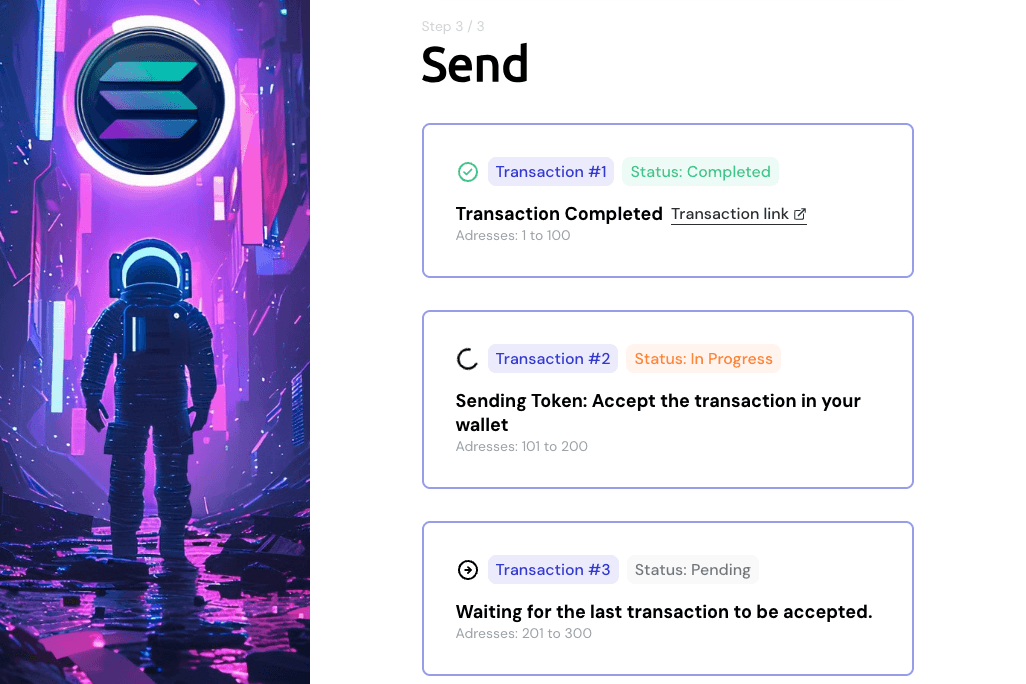
Metasender automatically advances to Step 3: Send and prompts your wallet to sign the actual batch transfer.
Solana caps each transaction at a small number of recipients (see the FAQ for the exact numbers — it's much lower than EVM's 400). If your list is larger, Metasender splits the operation into several transactions and asks you to sign one per batch.
For each batch, the wallet popup will:
- Show the mint address of the SPL token being sent
- Show the SOL cost (network fee + Metasender fee + any ATAs created in this batch)
- Ask for your signature
Step 9 — Confirm completion
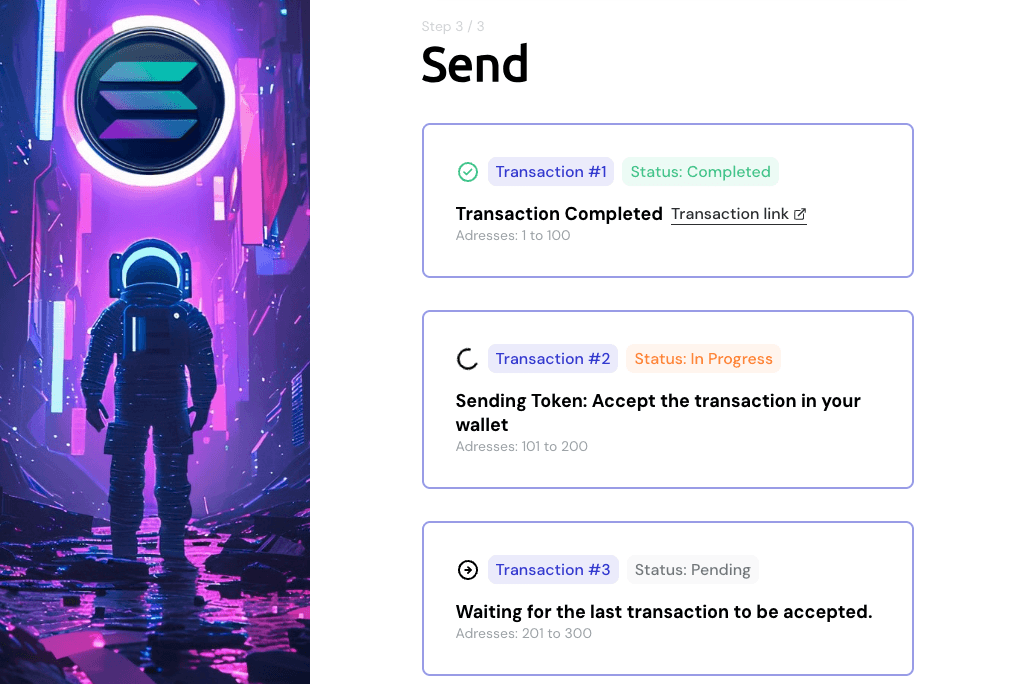
When all transactions are confirmed, you'll see:
- Status: Completed badge on each transaction card
- Transaction link — clickable, opens Solana Explorer / Solscan to verify each transfer on-chain
- A list showing which recipient range each batch covered
That's it — your SPL tokens are now distributed across every wallet on your list.
How much does it cost?
Three cost components apply to every SPL batch transfer:
- Metasender fee — a flat fee per transaction batch, paid in SOL. Use the fee estimator on the home page to get the exact cost for your batch before you start.
- Network fee — Solana's signature fee. A few thousand lamports per signature — effectively negligible.
- Associated Token Account (ATA) creation — for any recipient who doesn't yet hold the token you're sending, an ATA must be created on-chain. This costs about ~0.002 SOL of rent per new account, paid by the sender. Metasender batches these creations into the same transaction.
The ATA cost is the one that surprises first-time senders. If you're airdropping a freshly launched memecoin to 1,000 cold wallets that have never touched it, you'll pay ~2 SOL in ATA rent on top of everything else. If you're sending USDC to wallets that already use it, most ATAs already exist and the cost drops to nearly zero.
Common mistakes to avoid
- Forgetting that ATAs cost SOL. Especially for new memecoins, plan for ~0.002 SOL of rent per recipient who doesn't yet hold the token.
- Wrong network. Solana wallets don't auto-switch — verify your wallet is on the same network you selected in the app (Mainnet vs Devnet) before clicking Approve.
- Using an Ethereum address. Solana addresses are Base58 (e.g.
9WzDXwBbmkg8ZTbNMqUxvQRAyrZzDsGYdLVL9zYtAWWM), not the0x...hex format. Metasender flags invalid rows in red. - Pasting the token symbol instead of the mint address. If auto-detection misses your token, paste the mint address (also Base58), not the ticker.
- Not enough SOL for fees. The Metasender fee is paid in SOL, even if you're sending an SPL token. Top up before you start.
- Closing the tab during signing. Wait for the success state before navigating away. If a batch is interrupted, only that batch needs retrying — the confirmed ones stay confirmed.
FAQ
How many wallets can I send to in one transaction? Solana caps transaction size strictly. Per single transaction, Metasender ships up to 8 recipients for SPL tokens and 19 recipients for native SOL. Above that, Metasender automatically splits into multiple batches and asks you to sign one transaction per batch. Sending to 1,000 wallets means roughly 125 batches for an SPL token — still much faster than sending one by one.
Why is the SPL limit smaller than EVM's 400? Solana transactions have a hard byte-size limit (~1232 bytes), and each SPL transfer instruction (plus any ATA creation) eats into that budget. EVM transactions don't have an equivalent size cap — they're bounded by gas instead. It's a chain-design difference, not a Metasender choice.
Does it work with Token-2022 / extension tokens?
Yes. Metasender supports both the classic SPL Token program and Token-2022, including tokens that charge a built-in transfer fee. The fee is calculated on-chain automatically using the token's TransferFeeConfig.
Do I need to deploy any program? No. Metasender uses the existing SPL Token / Token-2022 programs directly. You don't deploy anything; you just sign the transfer transactions.
Is there an approve / allowance step like on ERC20? No. Solana doesn't have an allowance model. The "Approve" step in the UI is just a review screen — no signature, no on-chain transaction. You sign once per send batch in Step 3.
Can I use it for memecoin airdrops? Yes — that's exactly what most users use it for. Pick Token / MEMECOIN, paste the memecoin's mint address (or pick from auto-detected tokens), upload a CSV of holders, and send.
Can I send native SOL too? Yes. Pick Native as the asset type in Step 3 instead of Token / MEMECOIN. The flow is identical, except no ATAs are needed.
What if a transaction fails? The interface flags failed transactions in red with a link to the explorer. Successful batches stay confirmed — you only retry the failed ones, no need to redo the whole list.
Which networks are supported? Solana Mainnet and Devnet. Devnet is the standard place to test with airdropped fake SOL before running the real distribution on Mainnet.
Ready to send?
Stop signing 200 wallet popups for one airdrop. Distribute your SPL tokens or memecoins to dozens, hundreds or thousands of Solana wallets in minutes.
Ready to send?
Stop pasting addresses one by one. Distribute tokens to thousands of wallets in a single transaction.
 Launch Metasender